
What Is a Virtual Assistant and What Can They Do for Your Business?
Nobody starts a business hoping to spend Monday morning fixing invoices, chasing a supplier email, and rescheduling three calls. It happens anyway. The work that keeps a company running quietly eats the hours you meant to spend selling, building, or thinking, and it grows faster than revenue does. That is usually the moment someone types “virtual assistant” into Google for the first time. If that is where you are, this guide covers what a virtual assistant really is, the work they take off your plate, what it costs you to keep doing that work yourself, and how to tell whether hiring one fits the stage your business is at right now.
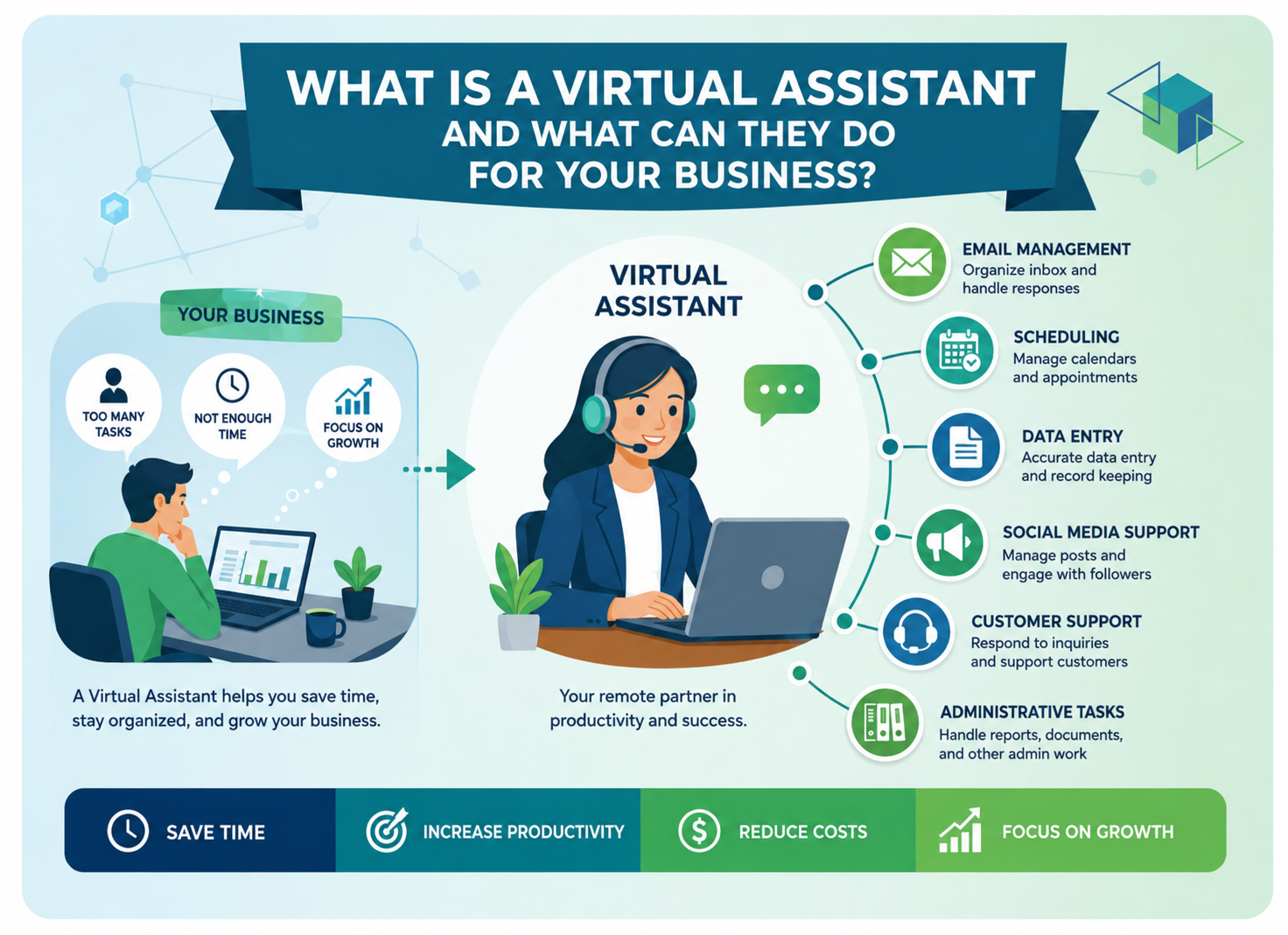
A virtual assistant is a trained professional who handles your admin, customer, and operational tasks remotely. You get skilled support on agreed hours without office space, payroll overhead or a long local hiring process.
What Does a Virtual Assistant Actually Do?
The honest answer depends on what is slowing you down. A virtual assistant is not one fixed job title. It is a working arrangement where a skilled person handles defined tasks for you from another location, usually on set hours and agreed tools.
In practice the work falls into a few groups. Administrative support covers inbox management, calendars, document filing, data entry, invoicing and travel booking. Customer-facing work covers live chat, email support and phone handling. Sales support covers lead research, list building and CRM updates. Then there is specialist work, where the assistant knows one platform or industry deeply, such as Shopify store management, property management coordination or social media moderation.
There is one more layer people miss. A good assistant does not only clear the task list you hand over. After a few weeks they learn how you like things done, notice the same problem repeating and fix the process behind it. Reports start arriving before you ask. That is the difference between renting hands and gaining a teammate.
Virtual Assistant Services Businesses Use Most
These are the areas requested most often, and what each one solves.
Executive support: calendar control, meeting prep, follow ups and expense tracking, so a founder’s week stops collapsing under small commitments.
Customer service: phone, live chat and email support so buyers get replies in minutes instead of days, which protects reviews and repeat orders.
Data entry and CRM enrichment: clean records, merged duplicates, corrected contact details and a pipeline your sales team can actually trust.
Lead generation and research: prospect lists, market research, competitor tracking and the groundwork that makes outreach worth sending.
Shopify and e commerce support: product uploads, listing optimisation, order tracking and returns handling, with social media moderation to keep comment sections clean.
Most businesses start with one of these, then widen the role once they see the hours coming back.
Why Hire a Virtual Assistant for Business Instead of a Full-Time Employee?
A full-time hire makes sense when you have forty hours of steady work, a desk to fill and the budget to carry that person through quiet months. Plenty of small and mid sized businesses have none of those things. They have twelve hours of admin a week and a backlog that keeps growing.
Virtual assistant services fit that gap. You pay for the hours you use. There is no recruitment cycle, no equipment to buy, no office rent and no long notice period if your workload shifts. Because assistants can work across time zones, you can also cover evenings and weekends without asking anyone in your own office to take a night shift.
Owners tend to notice a second benefit later. Handing work over forces you to write down how that work is done. Once a process exists in writing or on video, it can be measured, improved and passed to the next person. A lot of businesses build their first real operating system this way, almost by accident.
How Do You Know You Are Ready to Hire a Virtual Assistant?
A few signs come up again and again.
You are answering customer emails at 11pm. Your calendar has double bookings. Leads sit in a spreadsheet for a week before anyone calls them. You have stopped doing the strategic work you are good at because the small stuff never ends. Or your team is fine on paper, but one person is doing three jobs and has started looking for a fourth employer.
If two or more of those sound familiar, the maths is simple. Work out what an hour of your own time is worth to the business. Then count the hours you spend each week on tasks that do not need you specifically. That gap is your answer, and it is usually bigger than people expect.
How to Hire and Onboard a Virtual Assistant Properly
Hiring is easier than handover, and most disappointing VA experiences trace back to a weak handover rather than a weak assistant.
Start by listing every task you want to delegate, tracked over two full weeks before you hire anything out. Mark which are daily, weekly and occasional. Group them into one coherent role instead of scattering them across three people. Be specific about tools, whether that is Gmail, HubSpot, Shopify or QuickBooks, because tool familiarity narrows your shortlist fast and shortens training.
Once you have chosen someone, set up access properly on day one. Record short screen videos of your process instead of writing long documents, since watching you do the task once beats reading three pages about it. Book a fixed weekly check-in for the first month. Begin with a small batch of tasks, confirm the quality, then widen the scope. Expect four to six weeks before the assistant works with real independence. That ramp is normal, and it pays back for years.
Common Mistakes to Avoid
Businesses trip on the same three things. First, delegating tasks without explaining the outcome, which leaves the assistant guessing at priorities. Second, hiring on the lowest hourly figure and then paying twice when work needs redoing. Third, dropping communication after week one and wondering why standards slipped. Fifteen minutes of feedback a week prevents nearly all of it.
Key Takeaways
A virtual assistant is remote, trained support for the work that keeps your business moving but does not need you personally. Virtual assistant services span admin, customer support, data, sales research, and platform-specific tasks. You pay for hours used rather than carrying a salary through slow months. Results depend far more on your onboarding than on the job advert you posted.
If admin has quietly become your second job, that is the signal to hand it over. Book a call with AcceleraOps, and we will map which tasks to delegate first, or see how our teams work before you commit.
What is a virtual assistant in simple terms?
A remote professional who handles your admin, customer, or research tasks for agreed hours, without working from your office.
What tasks can a virtual assistant do for my business?
Inbox and calendar management, customer support, data entry, CRM updates, lead research, e-commerce listings and social media moderation.
Is a virtual assistant cheaper than hiring in-house?
Usually yes, since you pay only for hours worked and avoid office space, equipment, payroll taxes and recruitment costs.
How many hours a week should I start with?
Ten to fifteen hours suits most small businesses. Track the results for a month, then scale hours accordingly.
How do I keep my business data secure with a VA?
Use password managers, role-based access, signed confidentiality agreements, and remove permissions immediately when an assistant leaves your account.

Ready to put these insights into action?
Let’s build your outsourcing strategy together. Free consultation, no
obligation.